

A rubric is more than a scoring grid. For many students, especially those with cognitive and learning disabilities, it can be a roadmap.
Consider an assignment that asks students to write a “well-organized, thoughtful analysis using appropriate evidence.” One learner may be able to infer what the instructor expects. Another student may be left wondering: How much evidence? What makes an analysis thoughtful? What does well-organized look like? Which parts matter most?
A good rubric makes expectations visible. It breaks a complex task into smaller parts, shows students what success looks like, and gives them something concrete to refer to while they work. That can make an assignment easier to navigate for everyone. For some students with disabilities, that clarity may be especially important.
How Rubrics Can Reduce Barriers
Students do not all approach an assignment with the same ability to infer expectations, organize a complex task, remember multiple requirements, or determine which information is most important. A thoughtfully designed rubric can reduce some of those barriers by making expectations explicit before students begin.
- Students on the autism spectrum may benefit from explicit expectations when vague or implied requirements are difficult to interpret. A rubric can make the unwritten rules of an assignment more visible.
- Students with ADHD or executive functioning challenges may benefit from a structure they can return to as they plan, prioritize, and keep track of multiple requirements.
- Students with learning disabilities or processing difficulties may benefit when complex expectations are divided into smaller, clearly labeled parts.
- Students with memory-related disabilities may benefit from an external reference rather than having to hold every assignment requirement in working memory.
- Students experiencing anxiety may benefit from greater clarity about what is expected and where to focus their effort.
These benefits aren’t limited to students with diagnosed disabilities. Clear expectations can also help first-generation students, multilingual learners, students encountering an unfamiliar type of assignment, and anyone who has ever looked at an assignment and wondered, “What is my instructor specifically looking for?”
A rubric with clear expectations reduces the amount of guesswork a student must do so they can spend more of their effort demonstrating what they have learned.
Start with Clear Criteria
Rubrics can pack a lot of information into a small space, so clear writing matters. Try to keep each criterion focused on one idea and use language students will readily understand. Avoid unnecessary jargon, long sentences, and descriptions that require students to infer what you mean.
Performance levels should also describe meaningful differences. Labels such as Excellent, Good, Fair, and Poor may tell students how they performed, but they do not necessarily explain why. Whenever possible, describe the observable qualities that distinguish one level from another.
For example, instead of writing “Demonstrates excellent analysis,” consider describing what successful analysis looks like: “Uses relevant evidence to support a conclusion and explains how the evidence supports that conclusion.”
Make Expectations Visible with Examples
A rubric can describe quality, and an example can help students recognize what quality looks like in practice.
Even a carefully written rubric may leave room for interpretation. Terms such as “clear organization,” “effective use of evidence,” or “thorough analysis” can mean different things to different people, especially to students who are still learning the conventions of a discipline or type of assignment.
When possible, show students examples of work that demonstrate the rubric criteria in practice. Showing examples from at least two performance levels can be especially useful. For instance, students might compare a response that meets the criteria for “Excellent” with one that falls into a “Developing” or “Needs Improvement” level. Rather than asking students to infer the difference from the rubric alone, the examples make that difference more concrete.
You can make the connection even clearer by briefly annotating the examples: “Notice how this response uses evidence to support each claim,” or “This response includes evidence, but does not explain how the evidence supports the conclusion.” Students can then connect the language in the rubric to decisions they can make in their own work.
Examples can be particularly helpful for students who benefit from concrete rather than implied expectations, including some students on the autism spectrum, students with executive functioning or processing disabilities, and students who may be unfamiliar with the conventions of an assignment or discipline. The goal is for students to understand what success looks like.
A note on privacy: When using previous student work, be sure you have appropriate permission to share it and remove identifying information as needed.
Keep the Structure Simple
Rubrics are a legitimate use of tables because the relationship between criteria and performance levels is tabular. But simpler tables are easier to navigate.
If you provide a rubric as a Word document, keep the structure as simple and consistent as possible.
- Use a real table in Word rather than tabs, spaces, or an image of a table.
- Identify the first row as the table’s header row.
- Avoid merged, split, and nested cells when possible.
- Run Word’s Accessibility Checker before sharing the file.
While an automated checker can identify some accessibility problems, it cannot determine whether your criteria are clear, meaningful, or easy for students to understand.
Give Students the Rubric Before They Need It
An accessible rubric is most useful when students can use it as a roadmap. Whenever possible, make the rubric available with the assignment rather than introducing it only when grades are returned. Students can then use the criteria to plan their work, check their progress, and better understand your expectations.
You might also invite students to use the rubric as a quick self-check before submitting. Ask them to identify one criterion they believe they have met successfully and one they would like to improve. This turns the rubric from something students receive at grading time into a tool they can use during their learning.
For students who benefit from additional support with planning, organization, or self-monitoring, that structured pause can also make a complex assignment more manageable.
Consider Building the Rubric Directly in Blackboard
For Blackboard courses, there is now an easier way to manage rubrics without relying on separate Word or PDF files. Blackboard’s new Course Rubrics page provides one place to find and manage all the rubrics in a course. Faculty can search and sort existing rubrics and create, edit, import, export, or reuse them from the same location.
You can access it from: Gradebook Settings > Course Rubrics > Manage Course Rubrics
You can also select Add Rubric from an assignment’s settings to open the Course Rubrics page and attach an existing rubric to that assessment. Building the rubric directly in Blackboard helps keep it connected to the assignment and grading workflow instead of requiring students to locate and open a separate document.
Perform a Quick Rubric Check
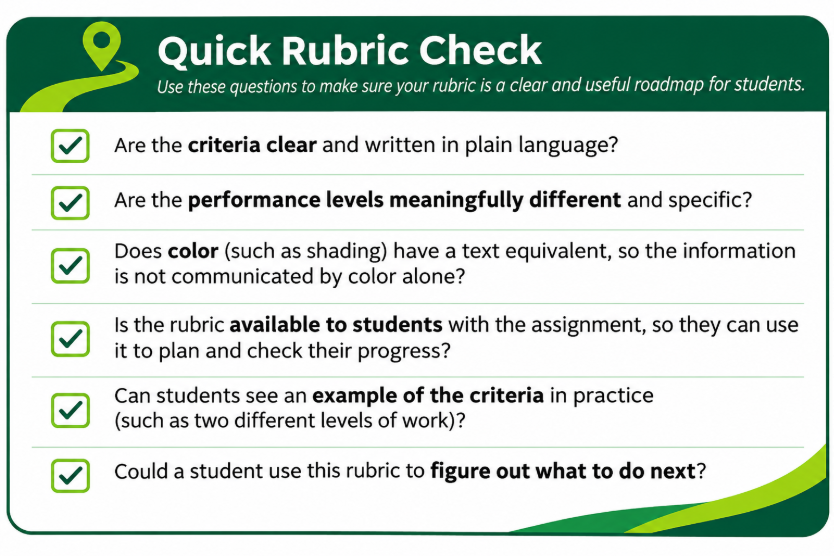
Before you share a rubric, take a minute to ask these four questions.
- Are the criteria clear and written in plain language?
- Are the performance levels meaningfully different and specific?
- Does color, such as shading, have a text equivalent so information is not communicated by color alone?
- Is the rubric available to students with the assignment so they can use it to plan and check their progress?
- Could a student use this rubric to figure out what to do next?
If students can identify the criteria, understand the difference between performance levels, and use the rubric to make decisions about their work, the rubric is helping students find their way.
Additional Resources
- Digital.gov Plain language guide series – principles and guidelines for writing in plain language.
- University of Illinois Chicago: Rubrics – construction, specificity
- Cornell Center for Teaching Innovation: Using Rubrics – differentiability
- Carnegie Melon Eberly Center: Creating and Using Rubrics – examples across disciplines
- W3C Tables Tutorial – how to design accessible tables
