
COD faculty are already doing meaningful work to make course materials more accessible this fall!
During Kickoff Week and the first week of classes, faculty opened Ally’s Instructor Feedback 2,341 times and made 1,441 accessibility fixes. Faculty also opened the Course Accessibility Report 432 times, using Ally’s course-level view to identify content that may need attention and prioritize where to begin. Even more gratifying, 62% of Instructor Feedback launches resulted in a faculty member making a fix.
This is a strong start, and a great example of how small, practical accessibility improvements can add up across the College.
Across 4,763 fall courses, the current average file accessibility score is 55%. There is still plenty of opportunity to improve course materials over time, but the early activity this semester shows that we are already engaging with the tools and taking action.
A New Quick Fix for Untagged PDFs
One of Ally’s newest faculty-facing features is PDF Auto Tagging, which can help with one of the more challenging accessibility tasks: adding structure to an untagged PDF.
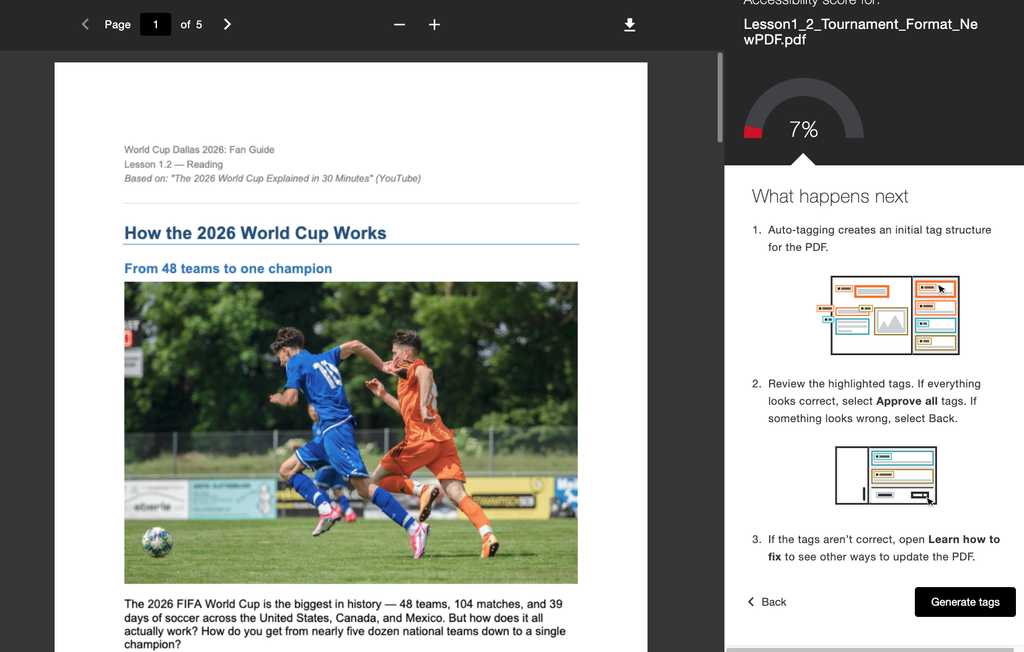
PDF tags identify elements such as headings, paragraphs, lists, and tables so assistive technologies such as screen readers can understand how a document is organized. With PDF Auto Tagging, Ally can create an initial tag structure for eligible PDFs directly through Instructor Feedback. Faculty can then review the updated document before using it. This can be especially helpful when working with older PDFs or documents that were created without accessibility in mind.
There are some limitations
Auto Tagging is available when Ally identifies a PDF as completely untagged. If a PDF already contains tags, even incomplete tags created through OCR (Optical Character Recognition), the option may not appear. Even with those limitations, PDF Auto Tagging gives faculty another way to make meaningful improvements without needing to leave Blackboard or start over with a document.
Additional PDF Quick Fixes
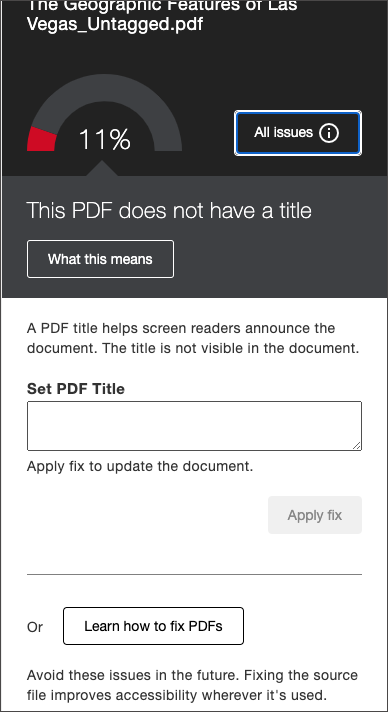
Ally has also added Optical Character Recognition (OCR), Missing Title, and Missing Language Set quick fixes for PDFs empowering faculty to add titles and language sets to course PDFs without leaving Blackboard. Applying OCR to your document with Ally is a quick win that increases a file’s score from 0% to 66%.
More PDF Support Is on the Way
Ally is continuing to build tools that can make PDF remediation more manageable for instructors.
- AI-assisted alternative text for images
- Support for identifying decorative images
- Improved tools for OCRed PDFs
These updates are part of a broader shift toward giving faculty more help directly within Ally by providing clearer, more practical ways to address barriers in PDF documents.
A Redesigned Course Accessibility Report is in the Works
Ally is also working on improvements to the Course Accessibility Report.
The report already gives faculty a course-level view of accessibility and can be a helpful place to decide where to focus first. The planned improvements are intended to make that experience easier to navigate and more useful, including clearer distinctions between accessibility issues in uploaded files and Blackboard content, better information about where files appear within a course, and additional insight into how students are using Alternative Formats.
Students Are Using Alternative Formats
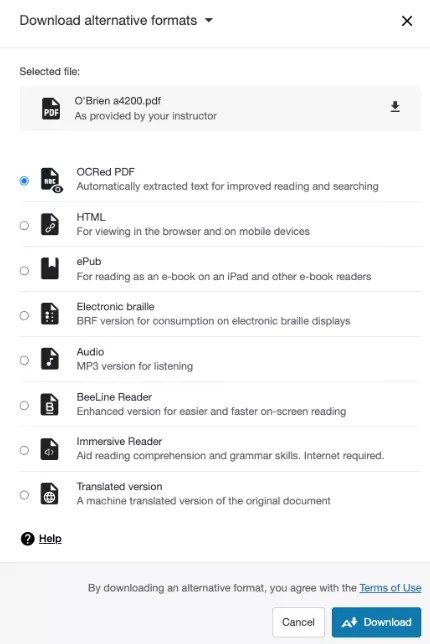
While faculty are working behind the scenes to improve accessibility, students are also actively using the flexibility Ally provides. That is a surprising amount of student engagement in just the first weeks of the semester.
Alternative Formats give students additional ways to interact with course materials. Depending on the original content, students may be able to create options such as audio, EPUB, electronic braille, tagged PDF, translated versions, and other formats that can better support how they read, study, or access information.
During Kickoff Week and the first week of classes:
- Students opened the Alternative Formats menu 8,246 times.
- They downloaded 5,745 Alternative Formats.
- 2,279 individual students downloaded at least one Alternative Format.
- Alternative Formats were downloaded in 1,154 courses.
- 68% of Alternative Format launches resulted in a download.
Every Improvement Helps
Accessibility work does not have to happen all at once. One improved PDF, one added image description, one corrected heading structure, or one replaced document can make a real difference for students.
The early numbers this fall are worth celebrating. COD faculty are opening accessibility feedback, making fixes, reviewing their courses, and steadily improving the learning experience for students. Thank you to the faculty members who are already taking time to make these improvements. That work matters!
Learn more about Ally:
- Learning Technologies Accessibility Articles
- Learning Technologies Blog: Ally articles by Christine Monnier
- Quick Fixes, Big Impact: Accessibility Wins for your PDFs (Blog Post)
- PDF Assisted Remediation FAQ (Blog Post)
- PDF Quick Fixes (Ally Support Article)
- Key Facts About Auto-Tagging
- Sign up for Ally Course Accessibility Report training in Cornerstone (PDH available)
